INDEPENDENT SOUTH AFRICAN PROCESS GUIDE
Home Affairs online booking, shown step by step
This guide helps you recognise the current public Department of Home Affairs route with large real screenshots and simple instructions. It does not ask for an ID number, login, payment, booking reference or application record.
Last official-source review: 25 August 2026 · This is an independent guide, not a Department of Home Affairs website.
→
→
Current route update: the former Branch Appointment Booking System now points users to My Home Affairs Online. If you see an old BABS link, use the Department’s current handoff page. See the public move notice ↗
VISUAL WALKTHROUGH
Start where the Department shows its public choices
Open My Home Affairs Online. Before you sign in, you should see the official public page explaining that it provides selected citizenship and identity-related services.
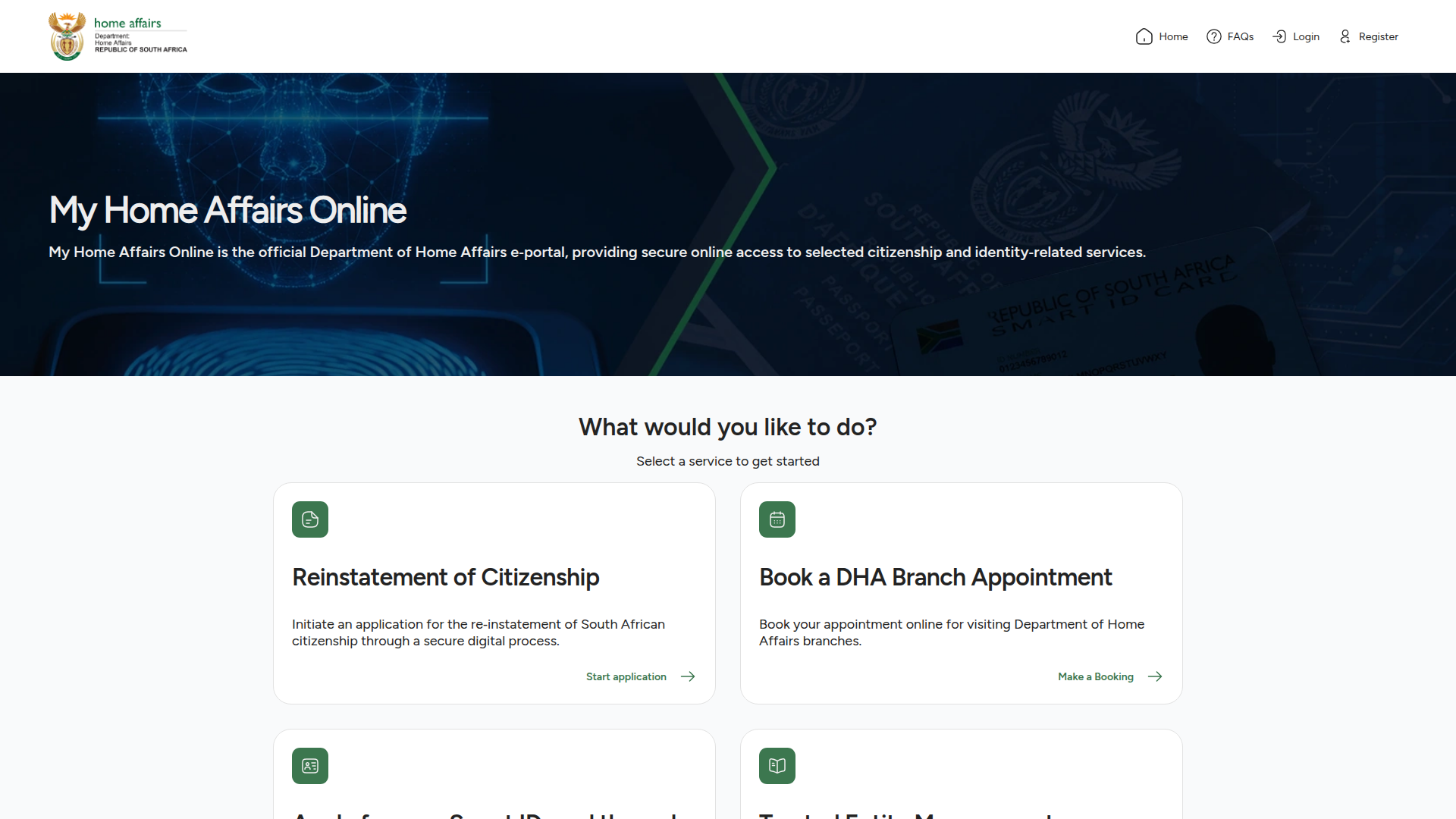
Use the visible branch-appointment option
On the public service-choice page, locate the card that says Book a DHA Branch Appointment. The official card explains that this is for booking an appointment to visit a Department of Home Affairs branch.
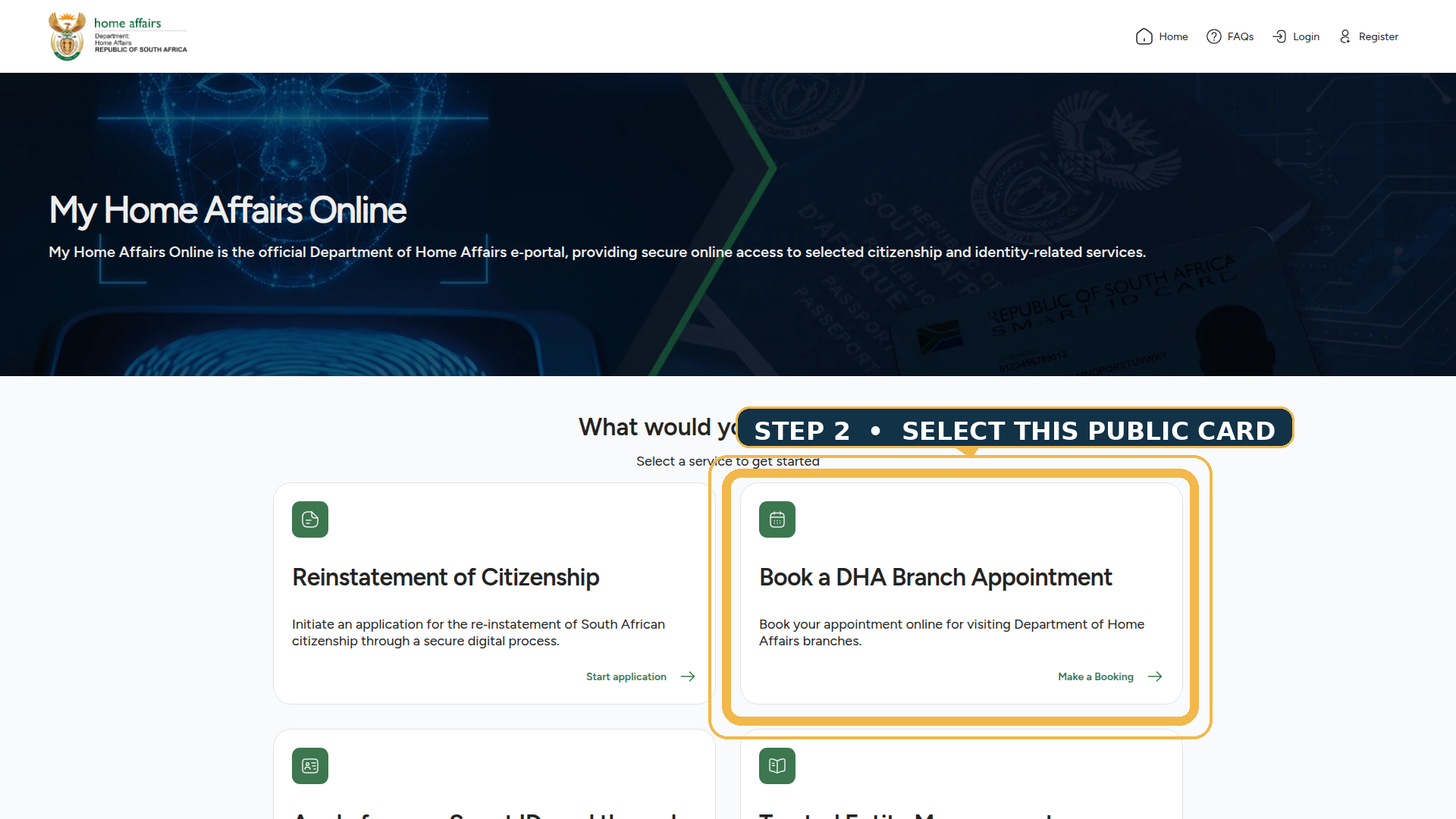
Do not follow an outdated booking route
The Department’s old Branch Appointment Booking System page now says that it has moved to My Home Affairs Online. This is useful if a saved browser link, older guide or message sends you to the former route.
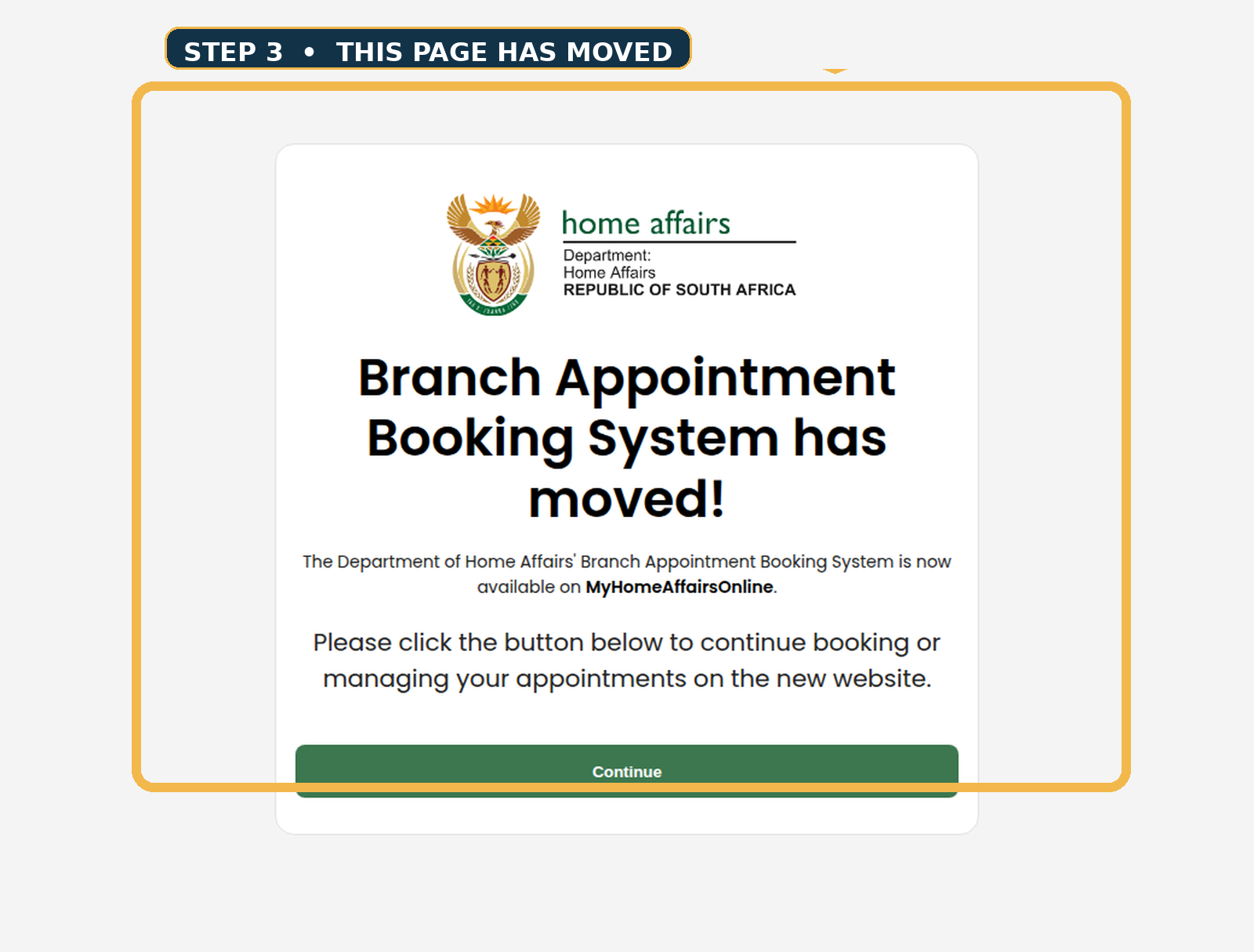
READ THE PUBLIC SERVICE LABEL CAREFULLY
One portal can show more than one starting path
The current official public page separates different selected services. This table records what is visibly stated on the public landing page; it does not promise eligibility, availability, fees or requirements beyond the Department’s own service.
| Public service card | What the current public page says | Where the official action continues |
|---|---|---|
| Book a DHA Branch Appointment | Book an appointment online for visiting Department of Home Affairs branches. | My Home Affairs Online ↗ |
| Smart ID card through a Partner Branch | Apply for a Smart ID Card re-issue directly through a participating Partner Branch. | Locate a Partner Branch ↗ |
| Reinstatement of Citizenship | Initiate an application through a secure digital process. | Open the public service ↗ |
| Trusted Entity Management | Manage an entity for Electronic Travel Authorisation applicants, subject to applicable immigration requirements. | Open the public service ↗ |
WHAT HAPPENS AFTER THE PUBLIC SCREEN
Keep the guide simple—and keep your details on the official service
The public screenshots explain where to start and what to recognise. When the official route moves into a registration, sign-in, booking, application, payment or tracking screen, continue only there. This guide does not reproduce those private steps because doing so would create a misleading imitation of a government transaction.
Use it to recognise the right service
Read the visible card title and description. If the Department’s public wording changes, follow the current official wording instead of an old screenshot.
Use it only on the Department route
Account, identity, appointment, payment and application information belongs on the official service you reached from its own public page.
Keep the Department instruction
Save or note the official confirmation and current service guidance provided for the specific task you selected.
Re-check before acting
For broader service details, branches, news and updates, use the Department’s public website rather than a forwarded link or third-party form.
UNDERSTAND THE ROUTE BEFORE YOU ACT
Follow the public path in the right order
The large screenshots above show the part of the process that a reader can safely recognise without creating an account. The official public page itself says users can register an account, apply for available services and track applications. Those are not three separate actions for this guide to perform; they are the official service stages that begin only after you have chosen the appropriate public card.
Recognise the official page
Begin at My Home Affairs Online rather than a copied link, forwarded social post or form on an unofficial guide. The public page identifies itself as the Department’s e-portal for selected services.
→
Read the service card
Use the card title and visible description to distinguish a DHA branch appointment from a Smart ID Partner Branch re-issue or another selected service. Do not assume every card does the same thing.
→
Continue only on the Department route
Once the Department takes you into its account-controlled service, use that official flow for registration, applications or progress. This independent guide stays outside those private screens.
That distinction matters because a trustworthy guide should make the starting point easier to understand without copying a government transaction. It can show a public screen, explain a public button and link to the official service. It should not ask a reader to paste identity details, payment information, booking reference numbers or personal records into a lookalike page.
PREPARE BEFORE YOU CONTINUE
Use the public screen to make a clear next decision
The purpose of a visual guide is not to overload the reader with unsupported requirements. It is to reduce the chance of using the wrong route. Before you select an official service card, take a moment to identify what you actually need and make sure you are on the current Department page.
- Start from the current source. The public My Home Affairs Online page is the current source used for this guide. If the card title or layout changes, follow the official current wording instead of this dated screenshot.
- Choose one clearly labelled service. A DHA branch appointment is described separately from a Smart ID re-issue through a participating Partner Branch. Read the visible description before you continue.
- Keep account data private. Registration, identity, application, booking, payment and tracking details should be entered only after you have reached the Department’s own account-controlled service.
- Keep official instructions. If the Department produces a confirmation or task-specific instruction, save it and review the current official guidance for that exact service before travelling or preparing documents.
- Use the Department website for wider updates. For public service information, branch locations, news or changing instructions, use the Department’s official public website rather than an unofficial website that claims live access.
At the point where a process becomes personal or task-specific, the official source must take over. That is why this guide uses large screenshots for the public learning stage and direct links for the private transaction stage.
IF THE PAGE DOES NOT LOOK LIKE THE SCREENSHOTS
Stop and return to the current official source
Public pages can change. If the service labels, route or instructions differ from this dated guide, use the current My Home Affairs Online page and the Department’s official public website ↗. Do not give personal information to a page simply because it resembles a booking guide.
A QUICK CHECK BEFORE YOU CONTINUE
If anything looks different, pause and restart from the official source.
COMMON READER QUESTIONS
Quick answers before you leave this guide
Step through common questions and get the answers you need.
Where do I start if I need a DHA branch appointment?
Start at My Home Affairs Online. Its current public page visibly includes a card called Book a DHA Branch Appointment.
Can I make the appointment on this website?
No. This is an independent guide. The official-route button sends you to the Department of Home Affairs service to continue.
Why are the screenshots so large on this page?
The purpose is to show the real public decision point clearly. The screenshots are instructional evidence, not decorative side images or fake portal designs.
Why does this guide not show login or booking forms?
Those are private account-controlled Department screens. This guide deliberately stops before personal data, appointment selection, payment and tracking.
What if an old Branch Appointment Booking System link opens?
The Department’s public handoff page says the system has moved to My Home Affairs Online. Use the public continuation route shown there.
Where can I check broader Home Affairs information?
Use the Department of Home Affairs public website for service details, branch locations, news and public updates.
Official sources used for the visual guide:
My Home Affairs Online ↗ · BABS public handoff ↗ · Department of Home Affairs ↗
HomeAffairsOnlineBooking.com is an independent information guide. It is not affiliated with the Department of Home Affairs or any South African government entity. Verify the current official source before taking action.
USE THE CURRENT OFFICIAL ROUTE
Clear screens, clear boundaries, safer next steps
A professional process guide should make the first public decision easy to understand. It should show readers what the current official page looks like, explain the visible option that matches their task and point them to the right official source. It should not replace the Department’s account service or make readers guess whether a private form is genuine.
Use the screenshots on this page to recognise the public route. Then use the Department’s own service to continue. If a public page changes, a service card disappears or an old link behaves differently, start again from the current official page rather than relying on a saved image. That approach keeps the visual guide useful while respecting the Department’s role as the source of truth.